Configuration reference
Everything pullpress.config.yml understands — the one file that turns your repo into a CMS.
The config file lives in the root of your repository and is versioned like everything else. Unlike content edits — which open a change request for review — saving the config is an administrator action that commits straight to your default branch, so a new content model takes effect at once (and is validated before it's written). It has a handful of top-level keys, a list of collections, and a small set of field types.
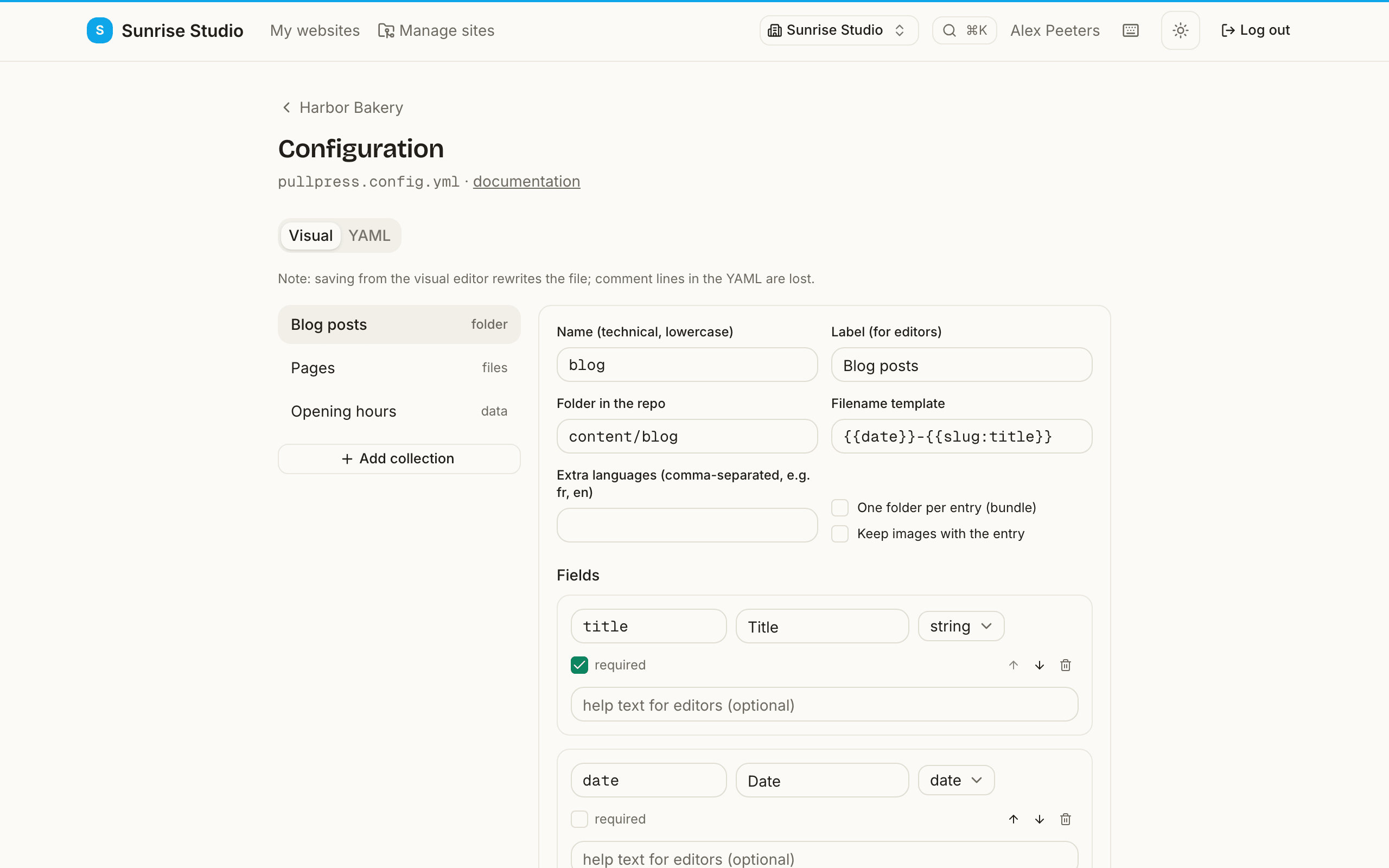
Prefer editing in the app? The built-in configuration editor offers a visual mode whose field-type picker groups every type with a one-line description, and its YAML mode validates before saving: a syntax typo is pointed out at its exact line and column, and structural problems are listed per field path. The file name is pullpress.config.yml (a .yaml extension works too).
Top-level keys
| Key | Description |
|---|---|
version | Config schema version. Currently always 1. |
media.folder | Repository path where uploaded images are committed, e.g. public/uploads. |
media.public_path | URL prefix the published site serves that folder from, e.g. /uploads. Used to write correct image links into your Markdown. |
collections | The list of content collections editors can work with. Each collection has a name, a label, a type and fields. |
components | Optional. A map of reusable named field groups, referenced from fields with type: component. Define a group once, reuse it across collections. |
Collection types
A collection describes one kind of content. Its type decides how entries map to files in the repository.
folder — one file per entry
Every entry is its own Markdown file inside the configured folder. Editors can create, edit and delete entries — ideal for blog posts, news items or team members.
collections:
  - name: blog
    label: Blog posts
    type: folder
    folder: content/blog
    fields:
      - { name: title, label: Title, type: string, required: true }
      - { name: date,  label: Date,  type: date, default: now }
      - { name: body,  label: Body,  type: markdown }
Frontmatter formats. All three frontmatter formats round-trip: YAML between --- lines, TOML between +++lines (Hugo's default) and a bare JSON object at the top of the file. Existing entries always keep the format, key order and unmanaged keys they already have. YAML frontmatter also keeps its # comments, anchors and |/> block strings on save — editing one field produces a diff that touches only that field. (TOML and JSON frontmatter keep values and key order, but comment lines in TOML are not preserved.) Set format: toml (or json) on a collection to create new entries in that format; detection fills this in for you when your existing content uses it.
Sites that use one folder per entry (Astro content collections, Hugo leaf bundles: content/my-post/index.md) set structure: bundle. Add media: colocatedto store an entry's images inside its own folder, referenced relatively (./photo.jpg) so your generator's image pipeline picks them up. Repository detection proposes all of this for you — it recognizes Astro content collections, Hugo leaf and branch bundles (plus contentDir and data/ files), Jekyll collections from _config.yml, Next.js content folders and date-nested bundles, and writes the generated labels in your UI language:
collections:
  - name: projects
    label: Projects
    type: folder
    folder: redesign/content
    structure: bundle      # one folder per entry: content/my-post/index.md
    media: colocated       # images live inside the entry folder (./photo.jpg)
    slug: "{{date}}-{{slug:title}}"
    fields:
      - { name: title, label: Title, type: string, required: true }
      - { name: date,  label: Date,  type: date, default: now }
      - { name: body,  label: Body,  type: markdown }
files — fixed pages
A fixed set of files you list explicitly. Editors can edit them but not add or remove any — right for one-off pages like About or Contact. Each file carries its own fields (nested under that file, not shared at the collection level), so every page can have a different shape.
collections:
  - name: pages
    label: Pages
    type: files
    files:
      - name: about
        label: About page
        file: content/about.md
        fields:
          - { name: title, label: Title, type: string, required: true }
          - { name: body,  label: Body,  type: markdown }
      - name: contact
        label: Contact page
        file: content/contact.md
        fields:
          - { name: heading, label: Heading, type: string, required: true }
          - { name: body,    label: Body,    type: markdown }
Repository detection uses this for section pagestoo: a Hugo branch bundle's _index.md(the landing page of a section) is not an entry of the folder collection, so detection collects every one it finds into a generated “Section pages” files collection — editable like any other page, no hand-wiring needed.
data — a single structured data file
One YAML, JSON or TOML file edited entirely through a form, with no Markdown body. Use it for structured data your templates read directly: opening hours, navigation menus, site settings. Keys in the file that are not in the field config survive every save, in all three formats. YAML files keep their comments too; TOML and JSON files keep their keys and order but are reformatted.
collections:
  - name: opening_hours
    label: Opening hours
    type: data
    file: data/opening-hours.yml
    fields:
      - name: hours
        label: Weekly hours
        type: list
        of:
          type: object
          fields:
            - { name: day,    label: Day,    type: select, options: [mon, tue, wed, thu, fri, sat, sun] }
            - { name: open,   label: Opens,  type: string }
            - { name: close,  label: Closes, type: string }
            - { name: closed, label: Closed all day, type: boolean, default: false }
Some data files are not a map but one big list — an array at the top of the file, like the Astro file() loader reads (src/data/authors.json holding [ …, … ]), or Hugo/Jekyll/Eleventy list data files. Set root: list and declare exactly one field of type list: its items are the file's top-level array, edited as a repeatable form. Items you don't touch are written back verbatim (their key order and any extra keys survive); TOML can't represent a top-level array, so this works for .json, .yaml and .yml files. Repository detection proposes this shape automatically.
CSV and TSV files (Jekyll _data/*.csv, spreadsheet exports) work the same way: they are always tabular, so point a root: list data collection at the file and list the columns as string fields of the single list field. The header row and column order are preserved on save; every value round-trips as text.
collections:
  - name: authors
    label: Authors
    type: data
    file: src/data/authors.json   # the file's root is [ … ], not { … }
    root: list
    fields:                       # exactly one field, of type list
      - name: items
        label: Authors
        type: list
        of:
          type: object
          fields:
            - { name: name,   label: Name,   type: string, required: true }
            - { name: avatar, label: Avatar, type: image }
folder of data entries — no Markdown body
Sometimes each entry is pure structured data with no article body — authors, team members, products, link lists. Give a folder collection a data extension (json, yaml, yml or toml) and every entry becomes a single data file that editors fill in as a form — the same create, edit, delete, review and history you get for Markdown, just without a body. This is exactly how Astro type: 'data' collections work, and repository detection proposes them for you.
collections:
  - name: authors
    label: Authors
    type: folder
    folder: src/content/authors
    extension: json          # each entry is a .json data file (no body)
    slug: "{{slug:name}}"
    fields:
      - { name: name,   label: Name,   type: string, required: true }
      - { name: bio,    label: Bio,    type: text }
      - { name: avatar, label: Avatar, type: image }
The whole file is the data (its format follows the extension), and — like a datacollection — key order and any keys not in your field list are preserved on every save. There's no body field, so don't add one; relations can point at these collections too.
Collection options
Beyond name, label, folder and fields, a folder collection takes these optional keys. Repository detection fills most of them in for you.
| Key | Description |
|---|---|
structure | flat (default) keeps one file per entry; bundle uses one folder per entry (folder/slug/index.md). |
media | site (default) sends uploads to the media folder; colocated stores them inside the entry's own bundle folder, referenced as ./photo.jpg. colocated requires structure: bundle. |
extension | File type for entries: md (default), markdown or mdx for Markdown pages; html, adoc or org for non-Markdown content (frontmatter still round-trips — declare the body as type: code so it is edited as plain text); or json, yaml, yml or toml to make every entry a data file with no body (a folder of data entries, like Astro data collections). |
format | Frontmatter format for new entries: yaml (default), toml or json. Existing entries keep whatever format they already use. |
nested | true also gathers entries from subfolders (up to five levels deep), grouped per folder. Off by default. |
locales | Extra language codes (e.g. [fr, en]) that make each entry editable per language, laid out per the i18n key. |
i18n | Where translations live: suffix (default) uses sibling files (post.fr.md); subfolder uses one folder per language (Hugo content/<lang>/, Astro/Starlight docs/<lang>/). With subfolder, point folder at the default language's folder and name that segment in defaultLocale — e.g. folder: content/en, defaultLocale: en, locales: [fr, de] puts French entries in content/fr. |
slug | Filename template for new entries. Default {{slug:title}}. Tokens: {{slug:field}} (slugified field), {{field}}, {{date}}, {{year}}, {{month}}, {{day}}. |
sort | How the entry list is ordered: { field, order } with order asc or desc. Defaults to the date field, newest first. |
A files collection instead lists each file with its own fields (and an optional per-file format); a data collection points at one file and shares one set of fields.
Field types
Each field in a collection becomes a form control in the editor. The common options label, required and default work on every type. Two more help your editors: a help string shows a hint under the field, and a placeholdershows example text inside an empty input. Required fields get a red asterisk and a friendly “what's missing” summary on submit.
Read-only fields. Add readOnly: trueto show a field with its stored value but keep editors from changing it — a settings document's name, a locked slug, an external id. It's locked in both the web editor and the iOS app, and the server restores the stored value on every save, so a read-only field can never drift no matter how a change arrives.
- name: title
  type: string
  label: Name
  readOnly: true            # shown, but editors can't change it
Per-language text.The interface adapts to each editor's chosen language, and you can do the same for your own label, help and placeholder text. The bare key is shown to everyone; add a _<language> suffix (one of en, nl, fr, de, es) to override it for editors using that language. Nothing is translated automatically — you write each variant.
- name: title
  type: string
  label: Titel              # shown to everyone
  help: De titel van je pagina
help_en: Your page title # only for editors using English| Type | Description | Example |
|---|---|---|
string | A single line of text. | { name: title, type: string, required: true } |
text | Multi-line plain text, shown as a textarea. | { name: summary, type: text } |
markdown | Rich text in the clean editor, stored as Markdown. | { name: body, type: markdown } |
number | An integer or decimal number. | { name: price, type: number } |
boolean | A yes/no toggle. | { name: featured, type: boolean, default: false } |
date | A calendar date. default: now fills in today. | { name: date, type: date, default: now } |
datetime | A date with a time of day. | { name: published_at, type: datetime } |
select | One choice from a fixed list, via options. | { name: category, type: select, options: [news, recipes] } |
multiselect | Multiple choices from a fixed list, shown as checkboxes. | { name: categories, type: multiselect, options: [news, events] } |
url | A web address, validated as https://… | { name: website, type: url } |
email | An email address, validated. | { name: contact, type: email } |
color | A color picker, stored as #rrggbb. | { name: accent, type: color } |
image | An image upload, committed to the media folder. | { name: cover, type: image } |
list | A repeatable list of items; of is a field definition for the item type. | { name: tags, type: list, of: { type: string } } |
object | A group of nested fields, defined with fields. | { name: cta, type: object, fields: [...] } |
relation | A reference to an entry in another folder collection (stores its slug). | { name: author, type: relation, collection: team } |
blocks | Stackable sections of different shapes (each item carries a _type key; override the key with typeKey). | { name: sections, type: blocks, blocks: [...] } |
hidden | Not shown to editors; written along with a fixed value (e.g. a layout key). | { name: layout, type: hidden, default: post } |
code | A monospace code block, with an optional language hint. | { name: snippet, type: code, language: js } |
map | A location, edited as latitude/longitude (stored as 'lat,lng'). | { name: location, type: map } |
compute | A read-only value derived from a template; each {{token}} is the name of a sibling field. | { name: ref, type: compute, template: '{{brand}}-{{sku}}' } |
keyvalue | Arbitrary key/value pairs, e.g. extra metadata. | { name: meta, type: keyvalue } |
seo | SEO panel: title + description (with length hints), canonical URL, OG image and noindex, with a search-snippet and JSON-LD preview. | { name: seo, type: seo } |
component | Expands a reusable field group from the top-level components map. | { name: cta, type: component, component: callToAction } |
list and object compose: a list of object gives you repeatable groups of fields, like the weekly opening hours in the example above.
Validation rules
Beyond required, a field can mirror the exact constraints your generator's schema enforces — so mistakes are caught in the editor with a friendly message, not by a failing build. Number fields take min, max and integer: true; text fields (string, text, markdown, code) take minLength, maxLength and a regular-expression pattern; list and multiselect take minItems and maxItems. Violations show inline while writing (an optional field may stay empty; its rules apply once something is typed), and the same rules run server-side on every save.
- { name: title,  type: string, required: true, maxLength: 70 }
- { name: rating, type: number, min: 1, max: 5, integer: true }
- { name: sku,    type: string, pattern: "^[A-Z]{2}-\\d{4}$" }
- { name: tags,   type: list, of: { type: string }, minItems: 1, maxItems: 8 }
Defining blocks
A blocks field lets editors stack sections of different shapes (a hero, a pull quote, a gallery…). List the section types under blocks; each is a named group of fields (with an optional label), just like an object:
- name: sections
  label: Page sections
  type: blocks
  blocks:
    - name: hero
      label: Hero
      fields:
        - { name: heading, type: string, required: true }
        - { name: image,   type: image }
    - name: quote
      label: Pull quote
      fields:
        - { name: text,   type: text, required: true }
        - { name: source, type: string }
Every item an editor adds records which block it is under a _type key (hero, quote, …), so your generator knows how to render each section. If your schema expects a different key — Astro's z.discriminatedUnion('type', …), or content imported from Decap CMS (which stores it as type) — set typeKey on the field (typeKey: type) and PullPress reads, writes and validates that key instead. The Decap importer sets it automatically, so imported entries keep working unchanged.
Conditional fields (showIf)
Any field can declare showIfto appear only when a sibling field matches. Hidden fields are cleared (so they never land in the frontmatter), and a conditional field's required rule applies only while it is visible.
fields:
  - { name: hasCta, label: Add a call to action?, type: boolean }
  - name: ctaUrl
    label: Button URL
    type: url
    required: true
    showIf: { field: hasCta, truthy: true }   # equals / oneOf also work
Nested collections
Set nested: true on a folder collection to also gather entries from subfolders (up to five levels deep) and show them grouped per folder — handy for documentation trees. Search and relation pickers pick the nested entries up automatically.
collections:
  - name: docs
    label: Documentation
    type: folder
    folder: content/docs
    nested: true            # gather entries from subfolders too
    fields:
      - { name: title, type: string, required: true }
      - { name: body,  type: markdown }
Reusable field components
Define a named field group once under the top-level components map, then drop it into any collection with a component field. It expands to a regular object group when loaded, so a change to the group updates every collection that uses it.
components:
  callToAction:
    - { name: label, type: string }
    - { name: url,   type: url }
collections:
  - name: pages
    type: folder
    folder: content/pages
    fields:
      - { name: title, type: string, required: true }
      - { name: cta,   type: component, component: callToAction }
Where media lives (and why not S3)
Uploads are committed to your repository, next to the content that references them. That is a deliberate choice, not a missing feature: the repo stays the single source of truth, images travel with their posts through branches, review and history, and cloning the repo gives you the complete site — no second system to back up or pay for.
Need a CDN or image resizing? Let your generator or host handle it at build time (Astro's and Next.js's image pipelines, Netlify image CDN, Cloudinary fetch URLs). PullPress keeps the original in Git; your build makes it fast. Uploads are resized to web dimensions client-side before they're sent — even a 20–50 MB phone photo — which in practice keeps repos comfortably small. External object storage (S3 and friends) would break the "your repo is everything" guarantee, so we don't plan it.
AI discoverability (llms.txt)
PullPress can generate an llms.txt at your repository root: a plain-text index of your site — its name, URL and, per folder collection, a list of entry titles — that AI answer engines read to summarize and cite your site correctly. It is built deterministically from your content model (no AI call, nothing leaves your repo).
Administrators find it under a site's Settings → AI discoverability (GEO) panel, which also shows a readiness score: whether your site URL is set, whether llms.txt is present, whether you have published content and description/SEO fields, and — if your site URL is reachable — whether the homepage exposes a meta description, Open Graph tags and JSON-LD. Click Update llms.txtto (re)generate the file; it's committed like any other change — through review, or straight to your default branch on open-publishing sites.
brandvoice.md below: brand voice guides how AI writes for you, while llms.txt helps AI find and citewhat you've already published. It doesn't manage robots.txt or your sitemap — leave those to your generator.Brand voice for AI agents
Drop an optional brandvoice.mdin your repository root to describe the site's tone, preferred and banned words, and writing level. AI agents connected over MCP can read it (via the get_style_guidetool) and follow it when drafting content. Because it's a normal file in your repo, it's versioned and reviewable like any other content — and unique per client.